Showing posts with label iPhone. Show all posts
Showing posts with label iPhone. Show all posts


How to copy movies and pictures from your iPhone?
You capture pictures with your iPhone, even sometimes you print-screen something from your iPhone; maybe you create movies by using your iPhone too.
Now, a question comes to you: How to copy movies and pictures from your iPhone?
The answer is as below:
a). Make sure all of the related Apple service is running in your Windows.
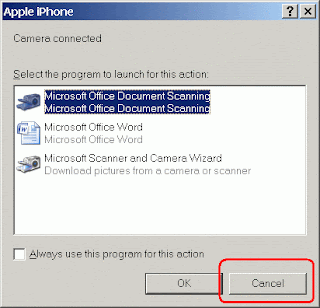
c). Go to "My Computer", you will see your iPhone device appear in the list:

d). Double-click it and then start copy-and-paste.
It's easy, right?
Now, a question comes to you: How to copy movies and pictures from your iPhone?
The answer is as below:
a). Make sure all of the related Apple service is running in your Windows.
- Apple Mobile Device
- Bonjour Service
- iPod Service
c). Go to "My Computer", you will see your iPhone device appear in the list:
d). Double-click it and then start copy-and-paste.
It's easy, right?
How to copy movies to iPhone?
You know that you can play movies in your iPhone, but you do not know how to copy movies into your iPhone?
Here is the way:
- Download a FREE copy of Any Video Converter.
- After that, convert your movies by using the Any Video Converter. Before convert the movies, just set the quality of the output to maximum. Such as 640 by 480 pixels, 30 fps and etc.
- When the conversion is done, the output files will be in mp4 format.
- Then, add the mp4 files to the iTunes on your PC. Make sure they are added to the play-list and also selected in
-> Movies tab. - After that, just sync your iPhone. Wait for a while (depends on how big is the file size) and you will enjoy the movies from your iPhone later.
Learnt from: Vincent Tan
How to create ringtone for your iPhone?
Ring, ring... isn't it the original iPhone ringtone is sucks?
Thinking of personalize the ringtone in your iPhone?
It's easy:
- Run iTunes with your iPhone connected to your PC.
- Go to the "Library" -> "Music". Select a song, for example "Hello World.mp3", from the list, right-click the song and choose "Get Info".
- iTunes will prompt you a form. Please go to the "Options" tab now. Now, you should decide the length for "Start Time" and "Stop Time". Please take note that the length of time should not exceed 30 seconds.
- After that, select the "Advanced" menu -> "Create AAC Version". iTunes will create a new file "Hello World.m4a". It will appear in the song list with the name "Hello World", you will be able to see this new record above or below "Hello World.mp3".
- Now, right-click the new file "Hello World.m4a" and select "Show in Windows Explorer".
- In the Windows Explorer, rename the file "Hello World.m4a" to "Hello World.m4r".
- In the iTunes song list, delete the record of "Hello World.m4a". Please take note that we are not delete the physical file, we just remove the record of "Hello World.m4a" in iTunes.
- After that, drag the "Hello World.m4r" from Windows Explorer to iTunes -> "Library" -> "Ringtones".
- Finally, sync your iPhone and you will get the new ringtone for incoming calls only.


How to update iPhone applications by using iTunes in your PC?
As you may noticed that update iPhone applications by using 3G is expensive, so why not look for a free-of-charge solution?
That is, update your iPhone applications by using iTunes in your PC.
It's easy:
- Run iTunes with your iPhone connected to your PC.
- Go to the "Library" -> "Apps". If you see something like "Apps 3", means there are 3 outdated applications in your iPhone or your iTunes records.
- At the bottom of the "Apps" screen, there is an option for you to check for updates.
- Click it and follow the instructions on the screen to complete the updates.

Subscribe to:
Posts (Atom)
-
If the following symptoms apply to you: You recently migrated from Azure MariaDB to Azure MySQL. MySQL Workbench is able to return data succ...
-
Environment: Visual Studio Code v1.83.1 Symtomps: 1). When you try to debug your Flutter project, you see this error message at the Terminal...
-
Hitting this error message " Unable to find resource t64.exe in package pip._vendor.distlib " when trying to upgrade your PIP to ...
