How to find all of the foreign keys in MySQL?

Select
*
From Information_Schema.Table_Constraints
Where constraint_schema = 'YOUR_SCHEMA_NAME' And
constraint_type = 'FOREIGN KEY'
Order By constraint_name Asc, table_name Asc;

The 'Microsoft.Jet.OLEDB.4.0' provider is not registered on the local machine

You have encountered the above error message in x64 platform, such as Windows 7?

Well, don't waste your time to find Jet Ole DB updates, it's not related with any update at all.

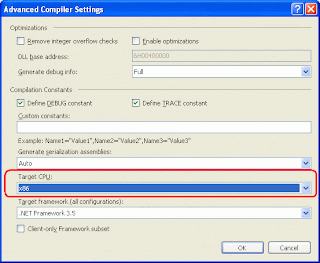
The solution to fix this issue is to change the target platform of your development from "AnyCPU" to "x86".

a). Go to project's properties.
b). Select the "Compile" tab.
c). Click the "Advanced Compile Options..." button.
d). Select "x86" in "Target CPU:".
e). Please make sure you do the same for Debug mode and Release mode.

How to retrieve the partitions name of a MySQL table?

Select *
From Information_Schema.Partitions
Where table_schema = 'Schema_Name' And
table_name = 'Table_Name'
Order By partition_name Asc;

How to add partition to MySQL table?

Alter Table Table_Name
Partition By Range (Field_Name)
(
Partition `201101` Values Less Than (201102),
Partition `201102` Values Less Than (201103),
Partition `201103` Values Less Than (201104),
Partition `201104` Values Less Than (201105),
Partition `201105` Values Less Than (201106),
Partition `201106` Values Less Than (201107),
Partition `201107` Values Less Than (201108),
Partition `201108` Values Less Than (201109),
Partition `201109` Values Less Than (201110),
Partition `201110` Values Less Than (201111),
Partition `201111` Values Less Than (201112),
Partition `201112` Values Less Than (201201)
);

The `201101` represents the partition name while the 201102 represents the Less Than value.

The server returned an invalid or unrecognized response

Error message: The Web server reported the following error when attempting to create or open the Web project located at the following URL: 'http://XXXXXX'.'The server returned an invalid or unrecognized response'.

Solution:
  • Go to your IIS.
  • In the "Authentication Methods", try to use "Anonymous access" and "Integrated Windows authentication".

    How to copy movies and pictures from your iPhone?

    You capture pictures with your iPhone, even sometimes you print-screen something from your iPhone; maybe you create movies by using your iPhone too.

    Now, a question comes to you: How to copy movies and pictures from your iPhone?

    The answer is as below:

    a). Make sure all of the related Apple service is running in your Windows.
    • Apple Mobile Device
    • Bonjour Service
    • iPod Service
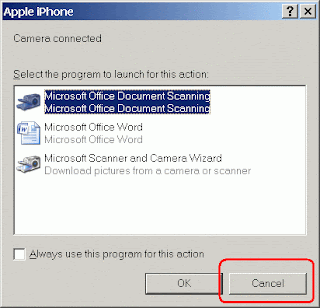
     b). Connect your iPhone to your Windows by using the USB cable. The following form will be displayed on screen, click the "Cancel" button now:


    c). Go to "My Computer", you will see your iPhone device appear in the list:


    d). Double-click it and then start copy-and-paste.

    It's easy, right?

    How to copy movies to iPhone?


    You know that you can play movies in your iPhone, but you do not know how to copy movies into your iPhone?

    Here is the way:
    • Download a FREE copy of Any Video Converter.
    • After that, convert your movies by using the Any Video Converter. Before convert the movies, just set the quality of the output to maximum. Such as 640 by 480 pixels, 30 fps and etc.
    • When the conversion is done, the output files will be in mp4 format.
    • Then, add the mp4 files to the iTunes on your PC. Make sure they are added to the play-list and also selected in -> Movies tab.
    • After that, just sync your iPhone. Wait for a while (depends on how big is the file size) and you will enjoy the movies from your iPhone later.
    According to the iPhone official site, the iPhone battery power can stand up to 10 hours for video playback. So enjoy your movies : )

    Learnt from: Vincent Tan